Business automation case study:a community yoga & wellness studio
The owner ran this studio for six years, answering email 24/7.
Now automations take care of emailing members, managing volunteers, space rental bookings, generating extended-health receipts, tracking promos, and creating income reports. It even emails her weekly with what's coming up and business insights.
The short version
- Client
- A community yoga and wellness studio, owner-operated, kept anonymous.
- Problem
- The owner handled member emails, trial offers, promos, and all reporting by hand, and had no view of members or income by category.
- Build
- 20 automations connecting 9 tools she already used, built on n8n, plus a custom booking app and a business dashboard.
- Result
- An estimated 350 hours a year back, roughly 6.5 to 7 hours a week. She uses the system daily. I maintain it.
automations built
Counted one per workflow, not one per variant it runs.
tools connected
All tools she already used.
hrs/yr back · est.
~6.5-7 hrs/week, across automations and space rental.
owner-editable email templates
Google Docs she edits herself.
Workflow automation across 9 tools
What got built
20 automations, built and run on n8n, connected to the tools she was already using. Nothing was replaced.
Staff reminders, cleaning coordination, daily monitoring, and nightly housekeeping run too.
Automated customer emails
Member emails, on autopilot
Problem
Every welcome email and every offer went out by hand, one member at a time.
Solution
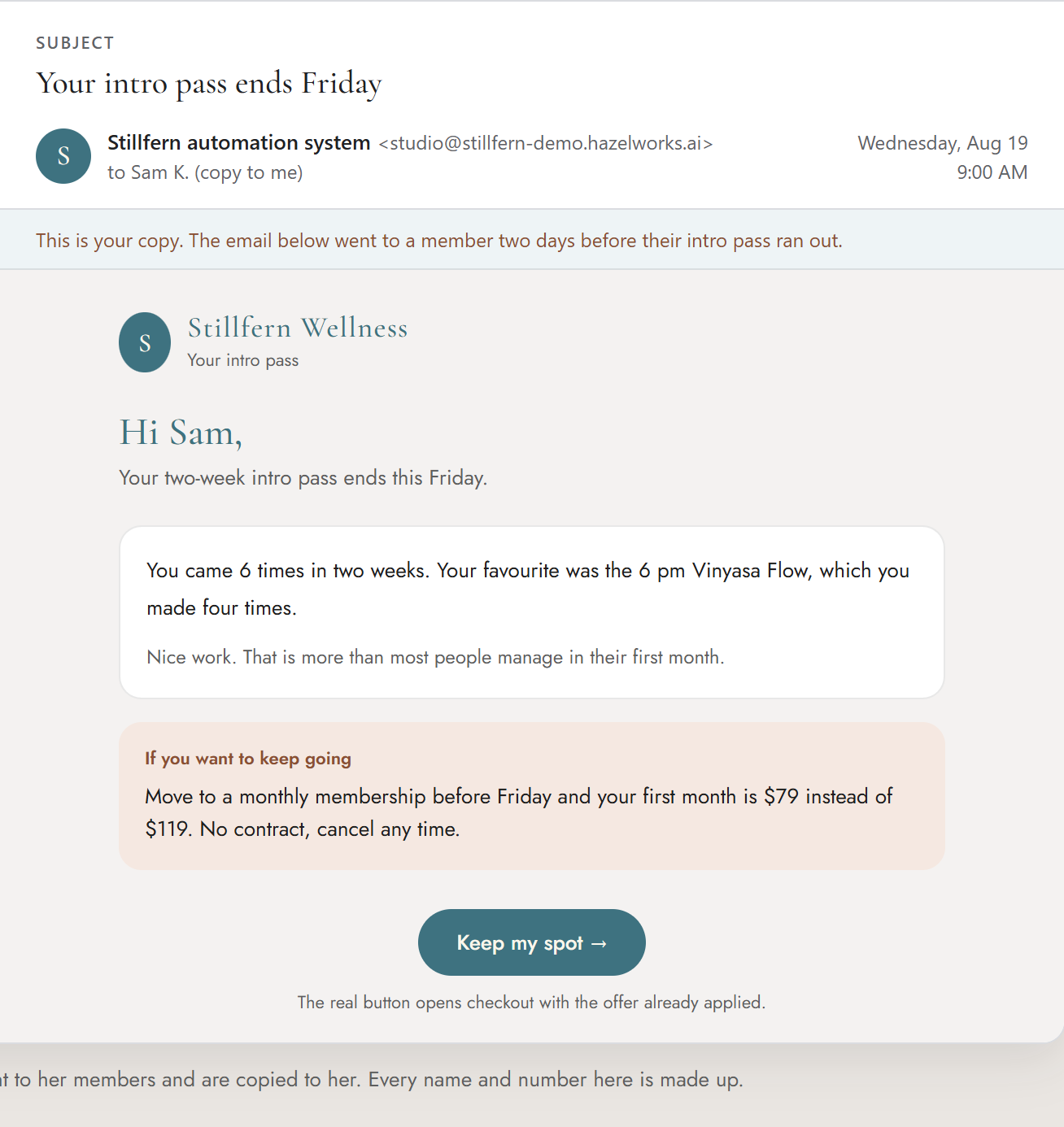
Welcome emails, the trial-ending $15-off offer, and the cancellation-save email now go out on their own, in the owner's own wording.
One of the emails the system sends on its own.
Something happens in Acuity Scheduling, ClassPass, or Gmail
a purchase, a booking, a cancellation
The router reads what was bought
one workflow picks the right email and sends it
- Trial welcome
- Membership welcome
- Trial-ending $15-off offer
- Drop-in upgrade offer
- ClassPass booking
- Volunteer seat opening
- Cancellation save
- Refund options
- 12th-month-free congrats
She sees every send
Every email BCCs the studio inbox, so she always knows what went out.
Her wording, always
All 18 templates are Google Docs. She rewrites them whenever she wants, without touching the automation.
It never guesses
An ambiguous cancellation gets flagged for a person to read, not guessed at.
The same build, in your business
Any business that sends the same handful of emails over and over, in its own words.
B2B company with sales reps
Lead and customer follow-ups go out while the reps keep selling. Add an AI model and each follow-up is written for that one lead: what they asked about, what they bought, where the conversation left off.
Veterinary clinic
Appointment reminders, post-visit care notes, and the vaccine-due reminder, in the clinic's own voice.
Renovation contractor
The quote follow-up, the “we start Monday” note, and the review request at handover, sent without anyone having to remember.
A custom booking app for renting the space
Automated end to end
Problem
Nobody outside the studio could see when the space was actually free, so every rental request started with a phone call or an email.
Solution
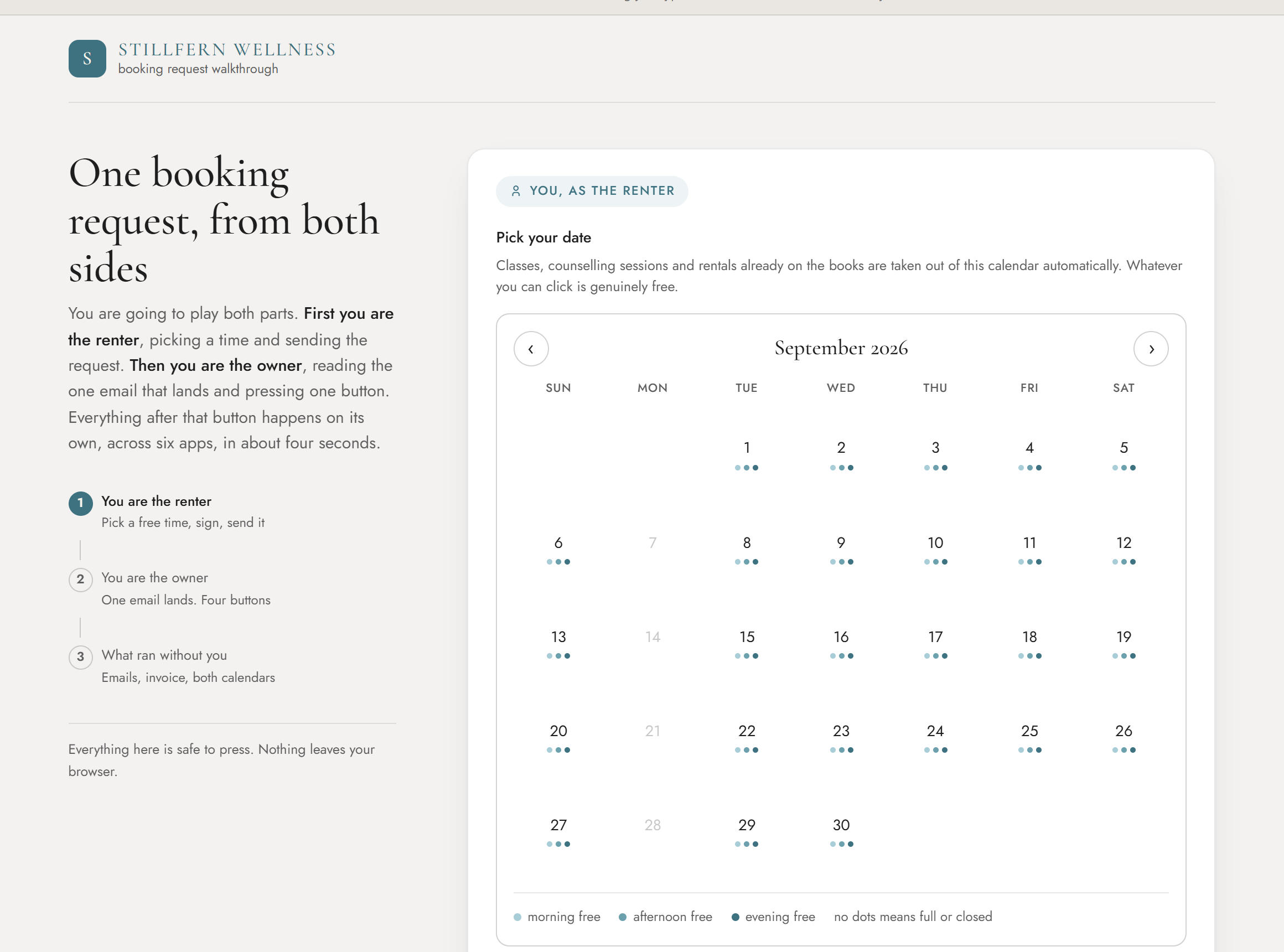
Renters book online. The request, the hold, the approval, the invoice, and the calendar entries are one chain, started by the renter and approved from the owner's inbox.
 See the booking demo→
The booking page is a real custom web app I designed and built, front end included, not just a backend workflow.
- 1
Open time goes public
A Google Calendar merges the class schedule from Acuity Scheduling with the counsellor's schedule from Jane. What is left is genuinely free time, and anyone can see it.
- 2
The renter books it
A custom booking page takes the request and writes a $0 hold in Acuity Scheduling, so the slot is protected while it waits.
- 3
The owner clicks one link
Her email has three: Approve, Decline, or Hold.
- 4
Approve does the rest
A Square invoice goes out and both calendars are updated.
A nightly digest flags any request that has sat quiet for 7 days or more.
The same build, in your business
The booking page is a custom web app: a user-friendly interface that connects your systems, with one-click approval workflows that trigger the invoices and follow-ups. More examples of what I can build:
Custom home builder
A site-visit request page that only shows the days your estimator is actually free, holds the slot, and lets you approve it from your inbox.
Veterinary clinic
Boarding and surgery requests that check the real kennel or surgery calendar before a client can ask for a date.
Manufacturers’ rep
A demo-unit or sample request page for your dealers, with the approval and the invoice built in.
Anyone who rents something out
A room, a truck, a chair, a person’s time. If you approve requests from your inbox today, this is the same chain.
Automated receipts and invoicing
Generated automatically
Problem
Clients needed extended-health receipts for their insurance claims.
Solution
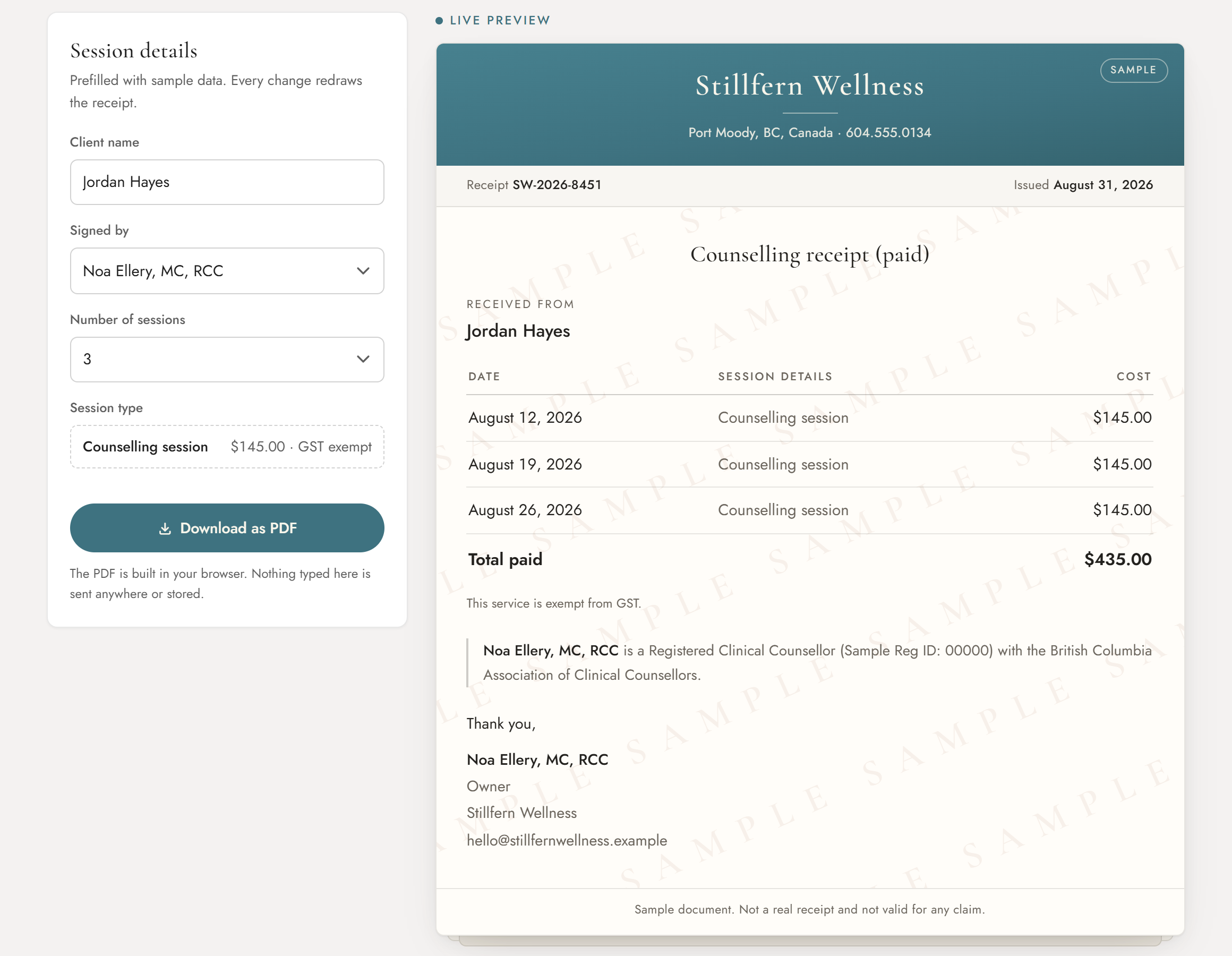
Auto-generated extended-health receipts, emailed to clients.
Staff fill in a short form. The form is protected, so only staff can reach it. The system takes those fields, fills a Google Docs template, exports it as a PDF, and emails it straight to the parent. No one opens a document. No one attaches a file.
The same build, in your business
Any document that is the same every time except for the names and the numbers.
Veterinary clinic
Insurance claim forms after every visit, filled from the visit record and emailed to the owner.
Renovation contractor
Change orders, completion certificates, and the deposit receipt, generated the moment the job reaches that stage.
B2B services firm
Monthly service reports and statements of work, built from the numbers you already track.
Manufacturers’ rep
Commission statements by line and by month, produced from your own order records.
A business dashboard, updated daily
The money picture
Problem
She could not see where the money came from. How many members she had, and what each plan brought in, did not exist anywhere as a number.
Solution
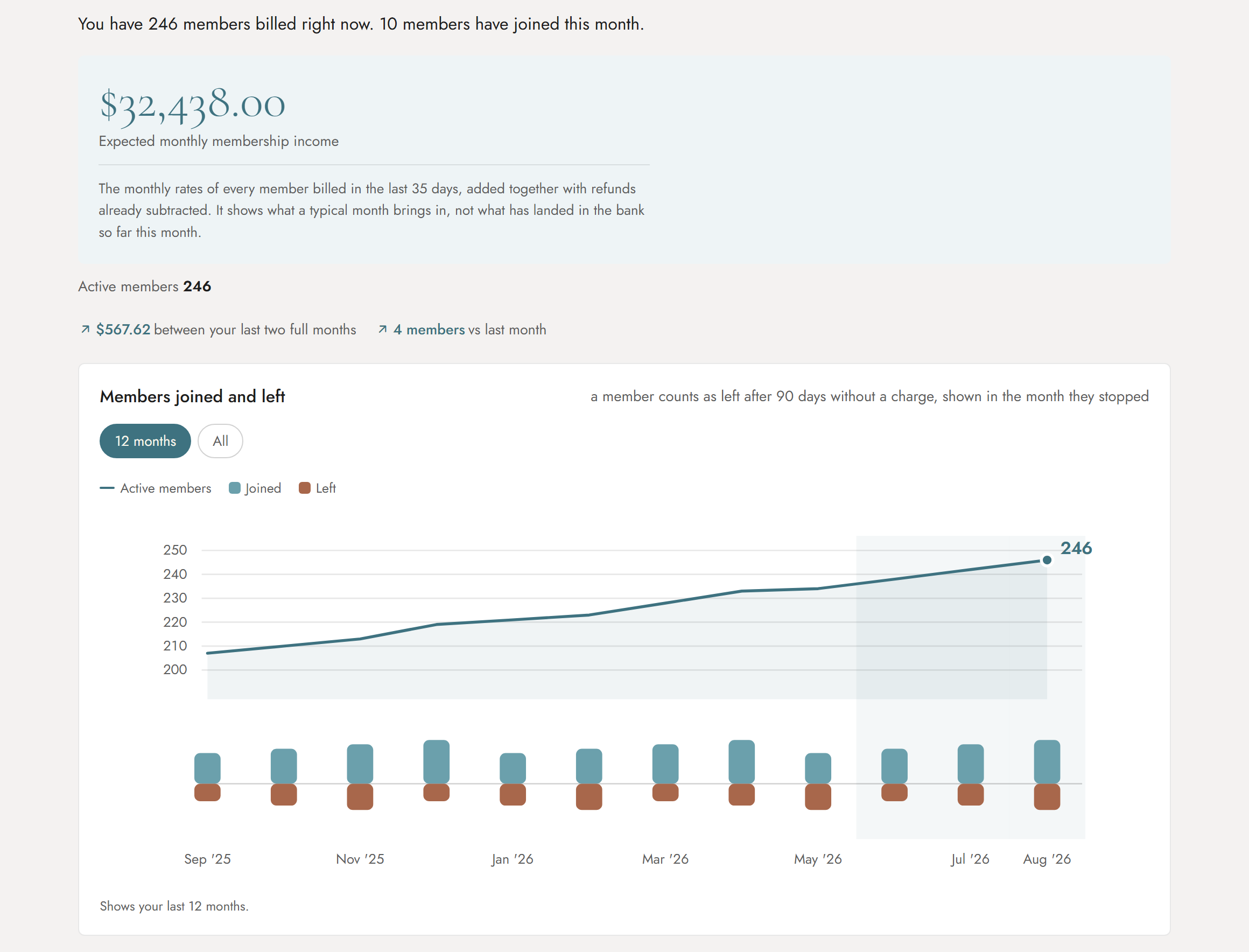
A business dashboard that pulls from Acuity Scheduling and Square every day. Members and income, by category, with nothing typed in by hand.
Before
Acuity Scheduling held the bookings. Square held the payments. Neither could tell her how many members she had, or what each plan brought in.
After
Both feed one dashboard. Members and income by plan, recomputed every morning.
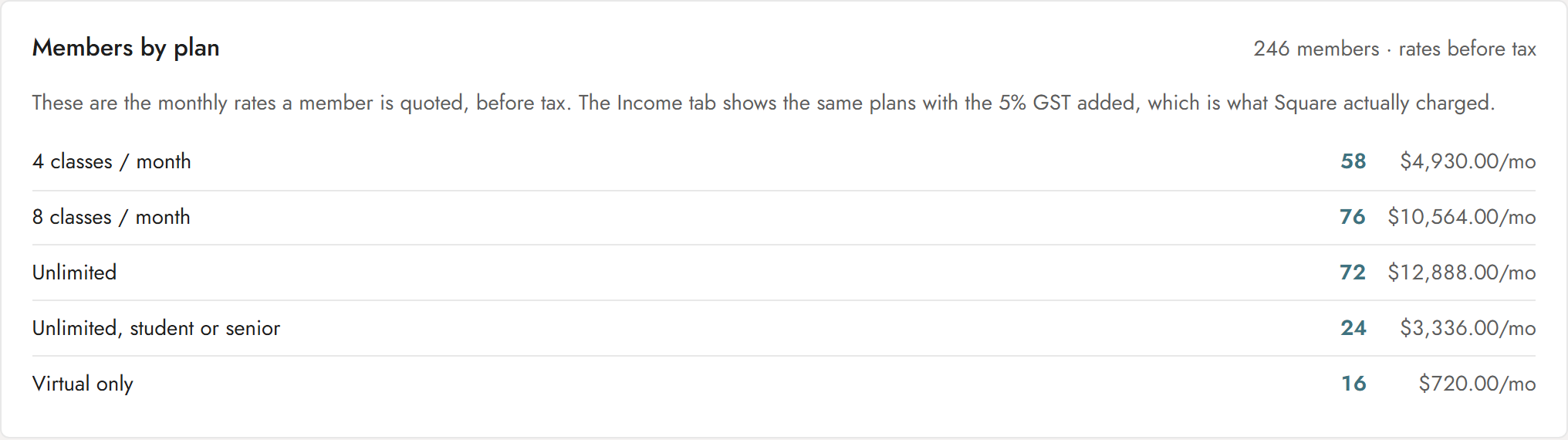
Members tab
How many members she has on each plan, and what each plan brings in a month. This is the number that did not exist before.
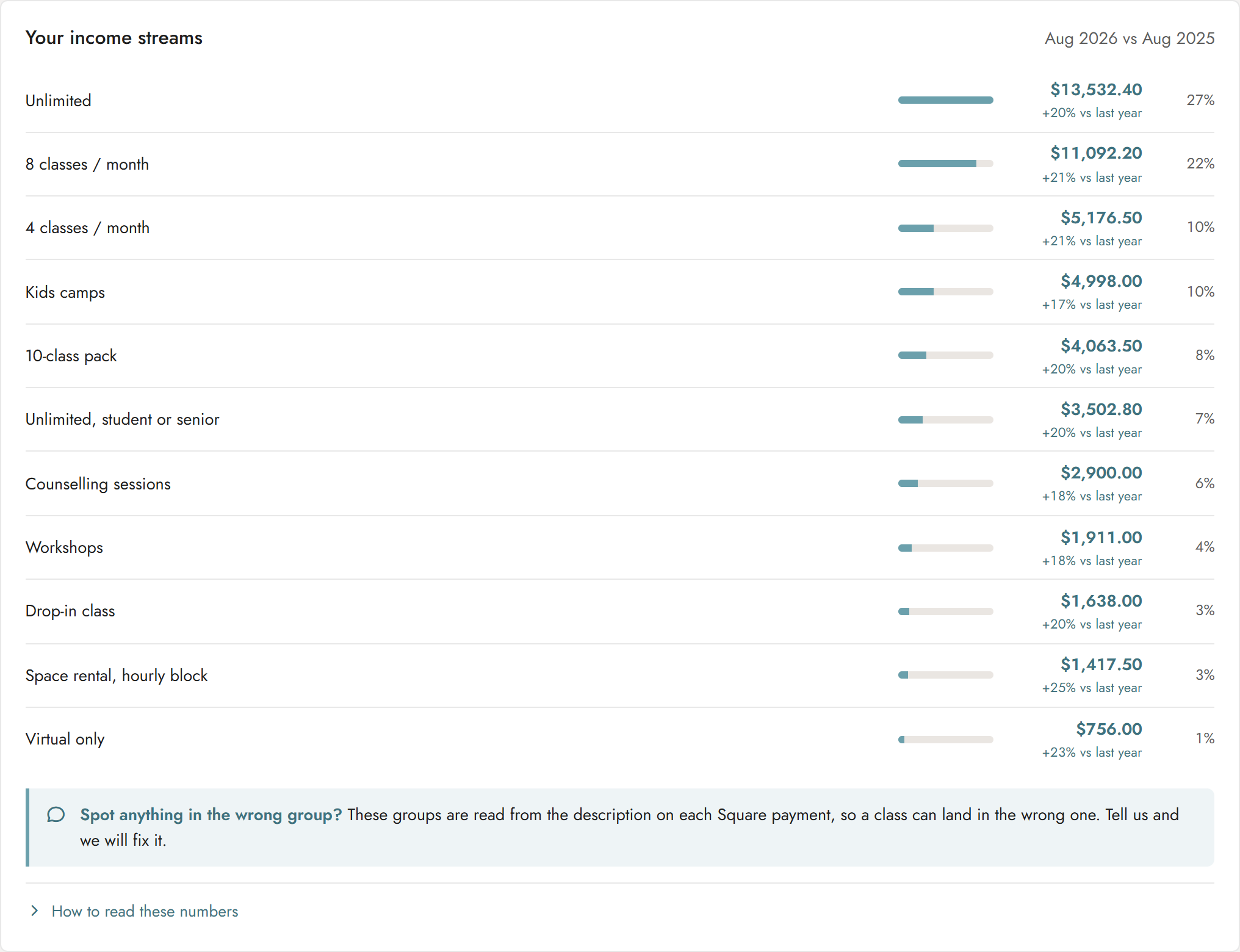
Income tab
Every income stream in one place, ranked, with this month against the same month last year.
The same build, in your business
Every owner I talk to has the same blind spot. The numbers exist, they just live in three tools that never meet. Are you missing any of these?
Renovation contractor
Jobs by stage, margin by job, and who still owes you, pulled from your estimating tool and your accounting.
Veterinary clinic
Revenue by service line, wellness-plan members, and the patients overdue for a visit.
B2B company with sales reps
Pipeline by rep, closed revenue by month, and the retainers about to lapse.
Manufacturers’ rep
Commission by principal, by line, by month, in one place.
Automated weekly business reports
Her Sunday briefing
Problem
Every week the owner had to go looking for what needed her attention, what was coming up, and how the numbers were trending.
Solution
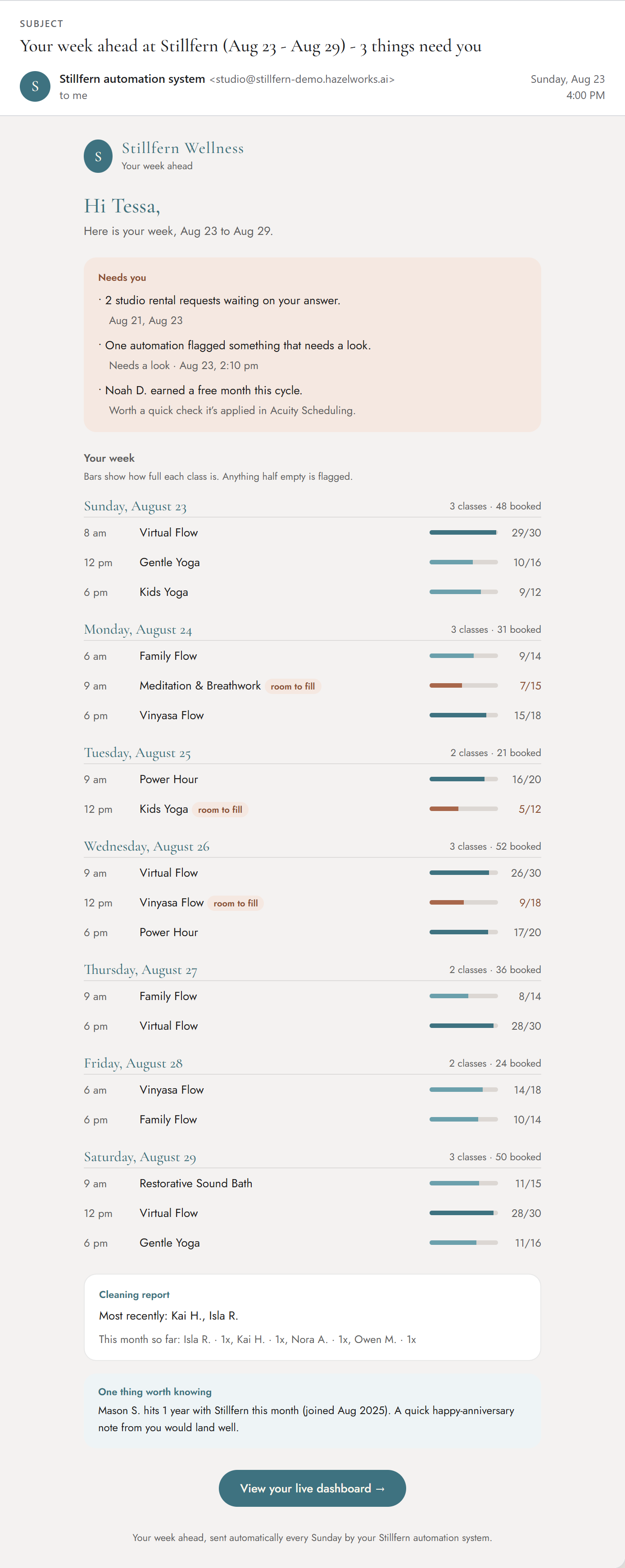
Every Sunday afternoon, the week ahead arrives in her inbox already sorted: what needs her, the schedule day by day, how the retreats are filling, and one insight line.
What she knows every Sunday, before the week starts
- What only she can do.
- Which classes are half empty, while there is still time to fill them.
- How the retreats are filling.
- Whether anyone cleaned.
- One insight from her own numbers. A cancellation spike, or a member's one-year mark worth a note from her.
The same build, in your business
The same Sunday email, with your week in it.
Manufacturers’ rep
Open quotes, orders due to ship, and which principals owe you commission, before Monday starts.
Renovation contractor
Which jobs start this week, which crews are short, and which invoices are past due.
Veterinary clinic
The week’s surgeries, the shifts nobody has covered, and the patients worth a call.
B2B company with sales reps
Each rep’s week, the proposals waiting on a reply, and the renewals coming due.
What she got back
automations built
Running on their own. Watched every day.
tools connected
All tools she already used. Nothing replaced.
things built from scratch
A custom booking app and a business dashboard.
hours a year back · est.
Roughly 6.5 to 7 hours a week.
350 hours a year is close to nine working weeks she does not spend on admin.
Estimated from her own per-task minutes, added up across every automation and the space-rental chain.
Member emails
Written one at a time, at night.
Sent automatically in her own voice, with a copy to her.
Space rentals
An email or phone call, then a back-and-forth.
Renters book online. She clicks Approve. The invoice goes out.
The numbers
Guessed at, or not known at all.
On her dashboard every morning. In her inbox every Sunday.
She uses the system daily. I stay on to keep it running and to adjust it as her business changes. AI watches the automations every day, and if one breaks it alerts me, not her.
“Hazel gave me back my freedom”
“…after owning a business for 6 years and needing to be responding to emails 24/7. Knowing my clients' needs are tended to in a timely fashion, and freeing up time, has given me freedom to enjoy the parts of the business I opened it for.”
If your day is full of manual & repetitive tasks,that's where we start.
Tell me the work you're tired of doing and let's automate it.